
Energy monitor
on Web Server
PowerFlow,P1 energiedisplay for Android
The P1 energy display and internet assistant continuously shows energy flows in the home and links to weather forecasts, YouTube, ChatGPT, Google Maps
PowerFlow – your P1 energy display and internet assistant for Android tablets
PowerFlow is the smart assistant that turns your Android tablet into a multifunctional info screen.
You can download the PowerFlow app for free at the bottom of this webpage as an “APK file” and then install it on your Android tablet. This apk file allows you to upgrade directly from within the app itself.
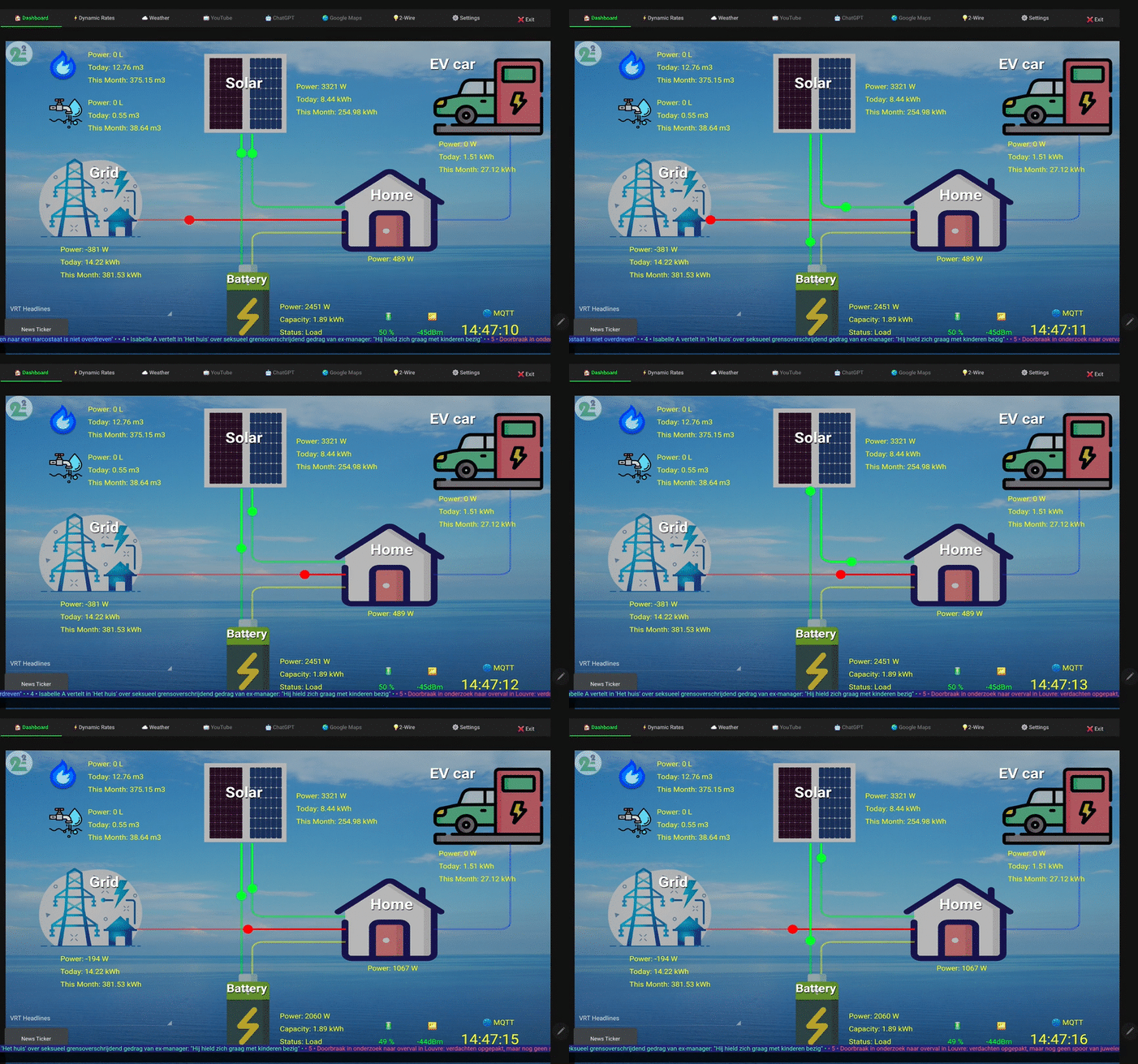
On TAB Dashboard you can see live the main energy flows in your home.
The TAB Dynamic Rates shows the “day-ahead energy prices” for Belgium, the Netherlands, France and Denmark, among others.
PowerFlow turns your tablet into a desktop smart display, similar to an Amazon Alexa or a Google Assistant (Nest Hub).
And as with these smart screens, you also have a lot of extra features with PowerFlow :
- TAB Weather: view detailed weather forecasts.
- TAB YouTube: play videos or let them play in the background.
- TAB ChatGPT: enter text or speak questions.
- TAB Google Maps: find your location or get a route.
- TAB Browser: connect directly to your local 2-WIRE web servers via its IP address, or access remotely to the 2-WIRE web servers via HTML_APPs such as ” APP LoRE”, “APP MEMo3, APP SmartEnergies” or APP MEGA, or just create a shortcut to any website.
There is also the “Ticker button,” which allows you to follow live RSS feeds of current news, weather forecast, soccer results, stock market indexes and more.
In short, PowerFlow turns your Android tablet into a personal, interactive and informative dashboard screen.
Please note that for the feature TAB Dashboard with your own consumption you need a 2-WIRE web server and a 2-WIRE MQTT account. As long as no web server is connected we show the values of a fictitious installation. All other functions are free to use by anyone who installs the app.
P1 energy display installation:
From your android Tablet : click on this link to download the PowerFlow_install apk on your tablet.
Then choose open with package_installation ( or chrome), once installed you will get the question upgrade? Click this and the application will be updated.
A PowerFlow start button is then created on the tablet.
You can see an example of the apk installation in the video to the right.
Functionalities:
P1 energy display link with the consumptions from your home:
In the “demo version” without your own 2-WIRE server and MQTT Token, practically all functions are available, but you can go to “settings” and enter your own 2-WIRE MQTT Token and MAC address so that the consumption of your own home is shown “live.”
Methods:
- In settings there is an entry box at the bottom: ‘code’
enter ‘VRM068’ and press ‘cancel’, that will reboot the app,
now in settings you can enter your own token and mac (12 digits, without ‘:’ ) and save.
Make sure you don’t copy spaces with it. - if you want to make it a ‘demo version’ again: fill in the place of your token the used mac address and press save (so token = mac) now the fields token and mac are locked again and work again the demo version
In the settings page, after entering Token and MAC, you can now enter the different channel numbers of the connected web server for import, export, solar, battery, gas, water and EV. For solar and battery you can enter up to 3 different channels depending on whether you have one or more inverters or batteries in your installation. If you have only 1 solar or 1 battery, fill in the remaining fields with “0”.
Only the text EVcar can be changed to e.g. boiler, WP,…. If you have no gas or no water also enter a “0”.
Confirm changes with OK button. Upgrade by pressing button.
TAB Dashboard: The speed of the animation is according to the measured power.
The “News Ticher” on/off button allows you to select an RSS feed and run a banner.
TAB Dynamic rates: shows the day-ahead prices for today and tomorrow. Use the BE button at the top to select your country code.
TAB Weather: Shows the weather forecast from the website meteo.be. With the button KMI you can update, you can also change your location. You can change this website url in the TAB settings.
TAB YouTube: the functionality is familiar, nice thing is that you can play music in the background while on the other tabs.
TAB ChatGPT: the functionality is familiar, with the “recognizer ready” button you can activate microphone and speak your question.
TAB Google Maps: enter location and press search
TAB Browser: In the DEMO version, some default web servers are already filled in here such as to the HTML APP LoRe, SMART ENERGIES and VRT max.
But once a custom token is filled in, you can start modifying these “pre-sets” yourself to, for example:
-
- Streaming Belgian radio stations such as for example https://be.radioonline.fm/ with JoeFM, QMusic, Nostalgie which you can then play in background on your tablet.
- Or create a photo frame of your Android tablet based on a new or an existing presentation from your Google Drive with Google slides
You can watch the functionality again on YouTube https://youtu.be/pa50G-XhhJo

TIP:
With the set 3x WiFi-MQTT plug and 1 year MQQT license in combination with an ELAN or ReMI you turn your plug water heater into a smart water battery, your electric plug auxiliary heaters become active in the off-seasons, and you get visibility into the yield and consumption of your plug batteries and/or plug solar panels.
All this without any cutting or breaking, possibly even with existing “dumb” devices, and live monitoring by PowerFlow.