
Energy monitor
on Web Server
APP HTML
The MQTT - HTML APP for remote access to the 2-WIRE web servers
Html app
The 2-WIRE web servers monitor and switch consumption from the web browser on any tablet, PC/Mac or smartphone within the local network.
With an optional MQTT license(one per location based on IP address), one can activate MQTT functionality in a web server. Once active, the various web servers ( LoWi3, ReMI, ELAN and MEMo3 ) then publish their 16 energy channels every minute (or 64 channels with MEMo3).
With a MEGA, things work slightly differently. The MEGA module does not publish data but requests meter readings from energy channels in web servers LoWi3,ReMI, ELAN and MEMo3 every hour. These meter readings are then used to calculate monthly consumption for billing of energy costs in SME units, garages, student rooms, service flats, EV chargers at employees’ homes, campsites, …
But once MQTT is active, these Web servers are accessible with a platform-independent APP .
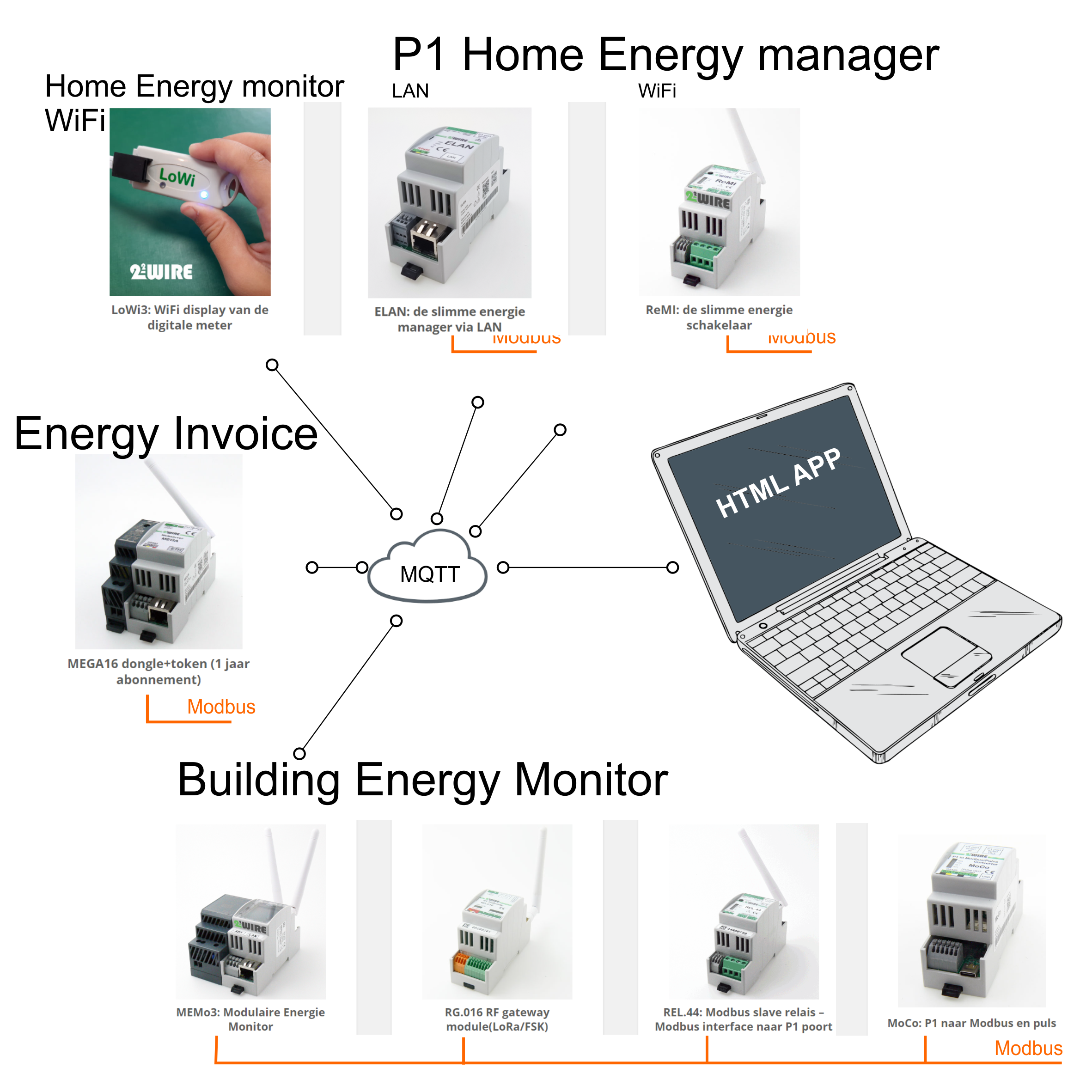
The energy channels of the LoWi3, ReMI, ELAN, MEMo3 web server which are published every minute to the created MQTT account can be used in different ways:
- Interconnecting multiple Web servers, works in 2 directions.
- MQTT interfacing with devices: LeON, THEo, WiFi-Plug
- Link to external applications such as Home Assistant, OpenHAB, among others.
- Linking to NOT 2-Wire hardware from OEM customers: EV charging stations, EMS systems, home automation, battery controls, cloud platforms, …
Note: With the P1 Fast publish (check in the setup page at LoWi3/ReMI/ELAN), P1 data is published via MQTT every 5..10 seconds. This is to enable controls/controls based on P1 values. - Enable switching to dynamic energy rates for the ReMI and ELAN ( see FAQ/ReMI).
- Remote access via the html APP to the various web servers.
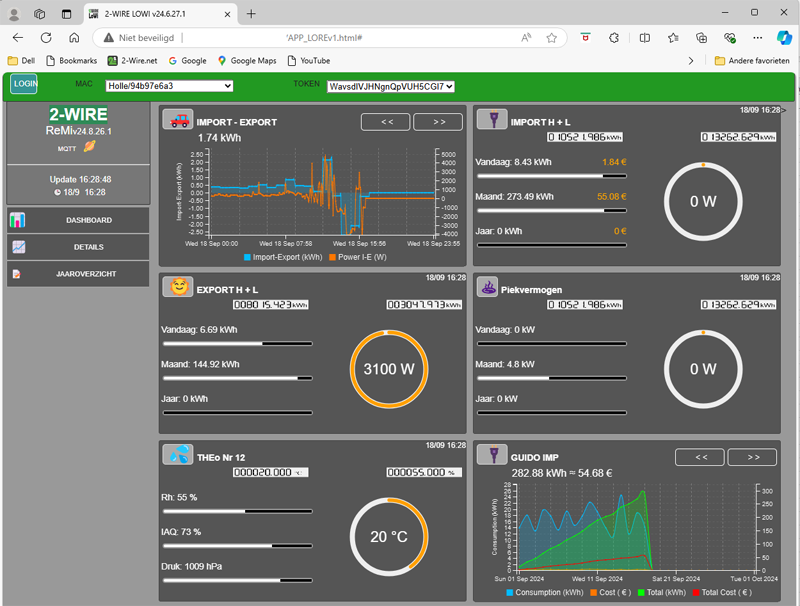
APP LORE (click on the link to launch the application)
for LoWi3, ReMI and ELAN web servers.
Up to 8 web servers simultaneously can be monitored via this APP. The APP serves only to monitor so no configuration. The APP works only in dark mode.*
Short webinar “html APP LORE: https://vimeo.com/1010964550
At FAQ/LoWi you will find a video tutorial on how to set up MAC and token in the APP.
*In the local web page, you can choose Light or Dark layout mode.
Experimental applications:
- html app (open web page via the link: APP SMARTENERGY
APP_DEBUG_MEMO3 (click on the link to launch the application)
for MEMo3 Web servers.
Up to 4 web servers simultaneously can be monitored via this APP. The APP serves to monitor and also to configure and test remotely. The APP gives full access just like the local web server.
On this website at FAQ/MEMo3 you will find a video tutorial on how to set up and use the APP.

APP MEGA tenant (click on the link to launch the application)
There are 3 APPs available for the MEGA webservers.
Up to 8 webservers at a time can be monitored through this APP. The APP has a COUNTER page ( for Syndicator ) and a CONFIG page ( for installer ).
- APP MEGA Installer: Configuration and testing and settlement
- APP MEGA Syndic: Settlement and testing of all meters
- APP MEGA Tenant: Meter readings & consumption tenant
Webinar “APP MEGA”: https://vimeo.com/1012282014/23507ab383
Only the version for the tenant can be downloaded here. As a trustee or installer you need to request the other APPs via email
At the MEGA Tutorials you will find how to set up the different APPs.
